
Meme Cute Beats
VGP StudioMusic
4.827.00 Reviews
- Version
- 0.0.40
- Installs
- 1.00M
- Age Rating
- Everyone
Screenshots
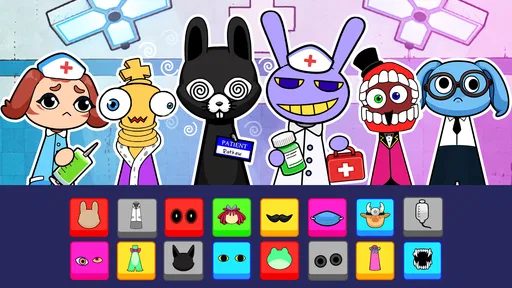
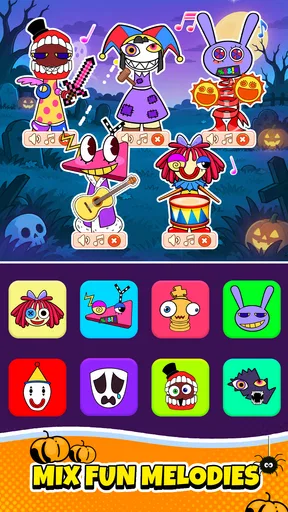
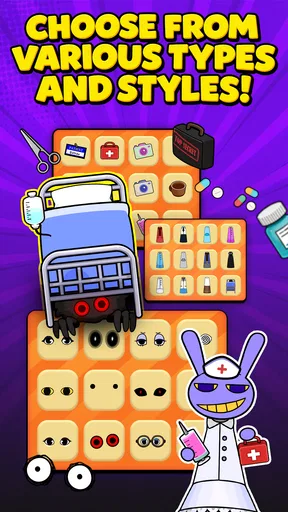
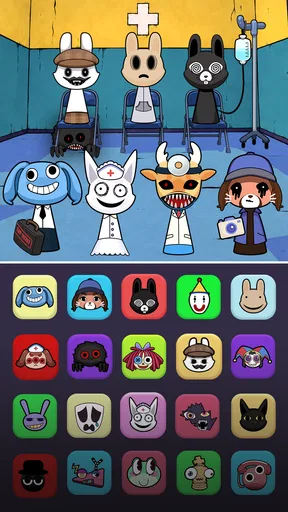
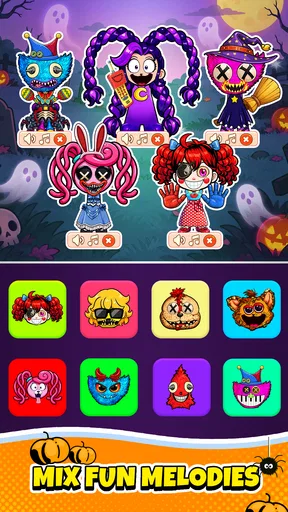
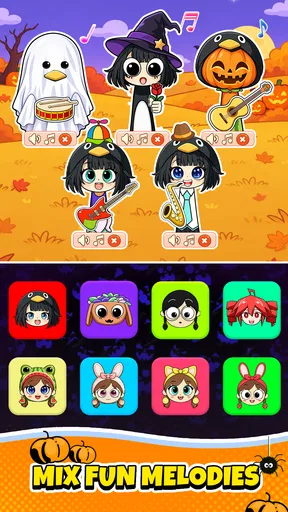
Our Review of Meme Cute Beats
 Analysis by Appyee
I went into Meme Cute Beats expecting a light music game built around playful sounds, and that is exactly where it makes the most sense. It is a free title from VGP Studio in the music category, designed for making short, amusing tracks rather than learning an instrument or producing polished studio recordings. The appeal is immediate: you experiment with cute audio pieces, combine them with comic rhythms, and listen to the result you have just assembled.
That simple idea gives the game an easy starting point. I do not need music theory, a keyboard, or a long tutorial session to understand what I am supposed to do. It feels suitable for a quick break, a casual creative moment, or sharing a silly musical idea with friends. At the same time, I would not confuse it with a full digital audio workstation. Its value comes from playful experimentation, not precision editing or serious composition.
The store summary describes the experience as mixing cute sounds and funny beats into personal music tracks, while the short store description calls it “Meme Cute Beats.” Those phrases point toward the right expectation, but the important distinction is that this is a game first. I judge it by how quickly it creates a satisfying interaction and how much fun the sound combinations remain after the novelty fades.
How the playful music-making loop feels in everyday use
The best way to approach the game is with a small goal instead of expecting a complete song. I might open it while waiting for a bus, choose a few sounds that seem to fit together, and keep adjusting until the result has a funny rhythm. That kind of session does not require commitment. If the combination works, I get a tiny creative reward; if it does not, starting again is part of the entertainment rather than a serious setback.
I also found that the game encourages listening carefully to transitions. A sound can be amusing on its own but awkward beside another one, so the interesting part is not simply collecting the most unusual noises. The real choice is deciding which pieces support the same mood. A softer cute sound may make a heavy comic beat feel less chaotic, while several loud effects together can turn a track into deliberate nonsense.
The most useful habit is to build in layers rather than tapping everything at once. I begin with the beat that gives the track its identity, add one contrasting sound, and then test whether a third element improves the rhythm. This makes it easier to understand why a combination works. It also prevents the common beginner mistake of creating a crowded result that is funny for a moment but tiring after repeated listening.
That layered approach is a practical advantage for younger players and for anyone who has never used music software. Traditional beat-making apps often present timelines, tracks, controls, and technical terms before the user has made anything enjoyable. Here, the creative decision is much smaller: does this sound make the current idea better? That keeps the first session friendly and lowers the barrier to experimentation.
Where it fits better than conventional music apps
Compared with a standard beat-making application, this game is less intimidating and more immediately comic. A conventional music tool is the better choice when I want tempo control, recording, detailed arrangement, effects, or export-oriented work. Meme Cute Beats is better when the goal is to play with sound without turning the activity into a project.
It also occupies a different space from rhythm games that test timing against a fixed song. In a typical rhythm title, success depends on following prompts accurately. Here, the attraction is making a combination and judging it by ear. That means the experience may suit someone who likes music but does not enjoy pressure from a score, a countdown, or increasingly difficult patterns.
There is a trade-off in that simplicity. Players who want a deep sense of mastery may run out of meaningful decisions sooner than they would in a full rhythm game or music editor. The game’s charm depends on the sounds and combinations staying entertaining. If I am looking for a long-term technical challenge, I would choose a more demanding alternative rather than expecting this small creative loop to become a complete musical hobby.
A realistic short-session workflow
For an everyday session, I would use three passes. First, I create a deliberately simple arrangement so I can hear the basic character of the selected beat. Second, I remove anything that competes with the main rhythm instead of automatically adding more. Third, I make one playful change that gives the track a punchline or surprise. This workflow produces a clearer result and makes each attempt feel intentional.
It is also useful to listen at a moderate volume rather than judging the track only through loud playback. Funny effects can seem exciting when they are amplified, but a balanced combination should still have a recognizable pulse when heard quietly. That small check helps separate a genuinely enjoyable mix from a pile of sounds that only feels energetic because it is loud.
Another practical tip is to treat failed combinations as information. If two sounds clash, I do not need to abandon the entire idea. I can keep the beat, remove the distracting layer, and try a different accent. This makes the game feel more like arranging a joke than searching randomly for a perfect button sequence. The process is especially approachable for children because the feedback is immediate and the cost of experimenting is low.
Who will enjoy it, and who should skip it
I would recommend it to casual players who enjoy memes, cute audio, and quick creative toys. It is also a reasonable pick for families looking for an Everyone-rated game that does not require advanced musical knowledge. The age rating makes it easy to consider for a broad audience, although adults should still use their own judgement about how a child uses any game and whether optional purchases are appropriate.
It is less suitable for someone who wants a structured course in rhythm, a serious songwriting tool, or a competitive leaderboard experience. It is also not my first recommendation for a player who needs a large amount of progression before the game feels rewarding. The enjoyment comes from the act of combining sounds, so a person who dislikes open-ended tinkering may find the experience too slight.
The game is free to start, which makes trying it straightforward. Optional in-app purchases range from $0.99 to $19.99 per item. That range matters because the right way to assess the game is not simply to call it free and stop there. I would begin without spending, learn whether the basic sound-mixing loop holds my attention, and only consider a purchase if it clearly adds something I personally want.
Spending, progress, and the feeling of pressure
I pay close attention to whether a free game makes me feel pushed toward spending before I understand it. In this case, the purchase information establishes that optional items are available, but it does not by itself explain how they affect the moment-to-moment experience. I therefore would not claim that purchases are necessary, harmless, cosmetic, or tied to progression without seeing those details directly in the game.
My practical advice is to set a boundary before experimenting. If I am playing for a few minutes of musical nonsense, I do not need to buy anything simply because an optional item appears. I would first ask whether the free experience already gives me enough sounds and combinations to enjoy a complete session. If the answer is yes, the game has already done its main job for me.
That approach also protects the game’s strongest quality: low-pressure creativity. The moment I start treating every locked possibility as an obligation, the playful loop becomes a shopping exercise. I prefer to keep the focus on arranging what is available. A good casual music game should let me feel clever because I made a funny combination, not because I paid to remove a barrier.
There is a further trade-off for parents. The Everyone rating is reassuring as a broad content signal, but it does not replace supervision around purchases. I would check the device’s purchase controls and make sure the person using the game understands that free installation and optional paid items are separate things. That is a simple precaution, especially when a game is designed to be accessible to younger players.
Fairness and whether competition matters here
I do not approach this title as a competitive game where spending should determine who wins. Its central appeal is personal experimentation, so the most relevant question is whether I can enjoy making tracks without feeling that another player has an unfair advantage. The available purchase information does not describe a competitive system, rankings, or paid advantages, and I would not invent one.
For my own use, that makes the fairest standard simple: can I open the game, create something amusing, and feel satisfied without buying an item? If yes, the free entry point is doing its job. If a player’s main motivation is competition, however, this may not be the right category of game to begin with. A dedicated rhythm or multiplayer title would provide clearer rules for skill, performance, and comparison.
The absence of a competitive focus can be a strength. I am free to make a deliberately ridiculous track without worrying that it is technically inferior to someone else’s. That makes the game more comfortable for beginners and for players who prefer sharing a joke over proving mastery. It also means the long-term motivation depends more on personal creativity than on external rewards.
Technical fit and what to check before installing
The current version is 0.0.32, and the game requires Android 8.0 or later. That gives me a clear compatibility check before installation: I would look at the operating system on the intended device first, particularly if I am setting it up on an older phone or a child’s tablet. The game is listed as free, so trying it does not require an upfront purchase.
Because this is a sound-focused game, the listening setup affects the experience more than it might in a text-based app. A quiet room or ordinary headphones can make combinations easier to judge. I would avoid turning the volume high just to make effects feel more dramatic. The point is to hear how the pieces relate, not merely to make every sound as strong as possible.
I would also keep expectations realistic about the early version number. A version such as 0.0.32 suggests that the product is still at an early stage of its release path, but that does not tell me exactly how often it will change or which areas will receive attention. I would install it because the current concept appeals to me, not because I am assuming a particular future roadmap.
What remains important to verify during personal use
Before spending money, I would inspect how optional items are presented in the actual interface and whether the game explains their purpose clearly. The purchase range tells me the possible cost of individual items, but not what each item contains or how it changes the experience. That is information I would want to understand at the moment of purchase rather than infer from the price alone.
I would also pay attention to how much variety the free starting experience offers over several sessions. One amusing mix can be enough for a quick test, but repeat value depends on whether I continue discovering combinations that feel distinct. This is a more useful personal test than judging the game only by its first few minutes. If the sounds still invite experimentation after several short sessions, the concept has real staying power for me.
Finally, I would decide whether the game’s presentation suits the person using it. Cute meme-style audio is very specific: some players will find it charming, while others may find the humor repetitive or noisy. That is not a defect that can be solved with more technical depth. It is simply the central taste question, and it is worth answering before expecting the game to become a regular part of a music-app collection.
My trust verdict after weighing the trade-offs
VGP Studio has made a focused music game rather than an all-purpose audio tool. I like that focus because it gives the experience a clear identity: choose playful sounds, shape a funny beat, and enjoy the result without needing musical training. The free entry point, broad age rating, and low-pressure creative format make it easy to recommend as a casual experiment.
My recommendation comes with a boundary. I would not choose it for serious composition, detailed rhythm practice, or a deep competitive progression system. I would also avoid spending until I had tested the free loop and understood exactly what any optional item offers. The available purchase range means a little attention is sensible, especially for family devices.
The game has reached over a million installs and holds a 4.6 average from around eleven thousand ratings, which shows that the concept has found a substantial audience. I treat that as useful context rather than a guarantee that it will match every taste. My own verdict is positive for short, playful sessions: try it free, build mixes in layers, and judge its lasting value by how much you still enjoy experimenting without feeling pressured to buy.
Privacy and Permissions
See what permissions an app requests and how it handles your data.
- Phone
- read phone status and identity
- Wi-Fi connection information
- view Wi-Fi connections
- Device ID & call information
- read phone status and identity
- Other
- view network connections, full network access, control vibration, prevent device from sleeping, Google Play license check
Verdict
Strengths of Meme Cute Beats
- Cute meme-themed visuals make the app instantly entertaining.
- Simple controls are easy for new players to understand.
- Short sessions work well for quick breaks.
- Catchy beats add energy and keep gameplay engaging.
- Lighthearted style appeals to casual players and meme fans.
Limitations of Meme Cute Beats
- Gameplay may feel repetitive after extended sessions.
- Some meme references may become outdated over time.
- Fast rhythms can be challenging for players with slower reactions.
- The cute art style may not appeal to every player.
- Progression could feel limited for users seeking deeper mechanics.
Similar Picks in This Category
View All
Tiles Hop Music & Ball Game
AMANOTES PTE. LTD.4.3

Magic Tiles 3™ - Piano Game
AMANOTES PTE. LTD.4.6

Real Piano
Bilkon3.7

Piano Game: Classic Music Song
Dream Tiles Piano Game Studio4.0

Smash Colors: Music Ball Rush
BADSNOWBALL HONGKONG LIMITED4.2

Piano Music Go-EDM Piano Games
Joy Journey Music Games4.5
Frequently Asked Questions
What is Meme Cute Beats, and what can I do with it?
Meme Cute Beats is a casual entertainment app centered on cute meme-style characters, music, and beat-based interactions. Depending on the available version, you may be able to tap along with rhythms, explore animated scenes, enjoy humorous sound effects, or interact with character-themed content. It is mainly designed for short, relaxing sessions rather than deep gameplay or advanced music production.
Is Meme Cute Beats free to download and use?
Meme Cute Beats can generally be downloaded without an upfront payment, but the exact free features may vary by platform and version. Some content, items, or functions could be supported by advertisements, optional purchases, or other in-app monetization. Before downloading, check the app-store listing carefully for information about ads, subscriptions, in-app purchases, and any restrictions on the free experience.
Does Meme Cute Beats require an internet connection?
The app may work for basic interactions without a constant internet connection, particularly if its sounds, animations, and core content are stored locally. However, an internet connection may be needed for downloading additional resources, displaying advertisements, checking updates, or accessing online features. Offline availability can differ between Android and iOS versions, so it is best to test the app after installation rather than assume every feature works offline.
Is Meme Cute Beats suitable for children?
Meme Cute Beats has a playful presentation that may appeal to younger users, but parents should still review the official age rating and privacy information before allowing children to use it. Advertisements, external links, in-app purchases, or data-collection practices may be present depending on the version. If a child will use the app, parental controls and purchase restrictions are recommended, especially on shared devices.
What should I check before installing Meme Cute Beats?
Before installing Meme Cute Beats, verify that your device meets the required operating-system version and has enough free storage for the application and any additional files. Also review the latest permissions, privacy policy, age rating, advertisements, and in-app purchase details in the official store listing. Since features and availability can change through updates, downloading from Google Play or the Apple App Store is the safest way to obtain the legitimate version.
Play our best games!


